
Delta Force‘s release on console means many new Operators are entering the fight between G.T.I., Haavk, and the third-party force, Ahsarah. If you play on console and plan on bringing some friends to the fight, there’s a crossplay option for you.
Here’s everything you need to know about crossplay and cross-progression in Delta Force.
How to play Delta Force with friends using crossplay
Delta Force should have crossplay enabled by default, which means you’ll match with players across all platforms in all game modes as soon as you log in. The only platform that’s excluded from the crossplay list is mobile, and you won’t be able to matchmake with them.
How to disable crossplay in Delta Force
If you don’t want to match with PC players when playing on console, there’s an option to turn crossplay off (and back on if you change your mind). The method depends on the platform, so refer to the instructions below for whether you play on PlayStation or Xbox.
- PlayStation 5: In-game settings – Game – Crossplay Settings – Crossplay Toggle
- Xbox Series X|S: Xbox settings – Account – Privacy & Online – Xbox Privacy – View Details – Communication & Multiplayer.
- PC: N/A
Unfortunately, if you’re on Xbox, to disable crossplay in Delta Force, you must turn off crossplay across the entire console, unlike PlayStation users, who simply get an in-game toggle. On PC, there’s no option to turn off crossplay, so you’ll get matched with console players either way.
Cross-progression in Delta Force, explained
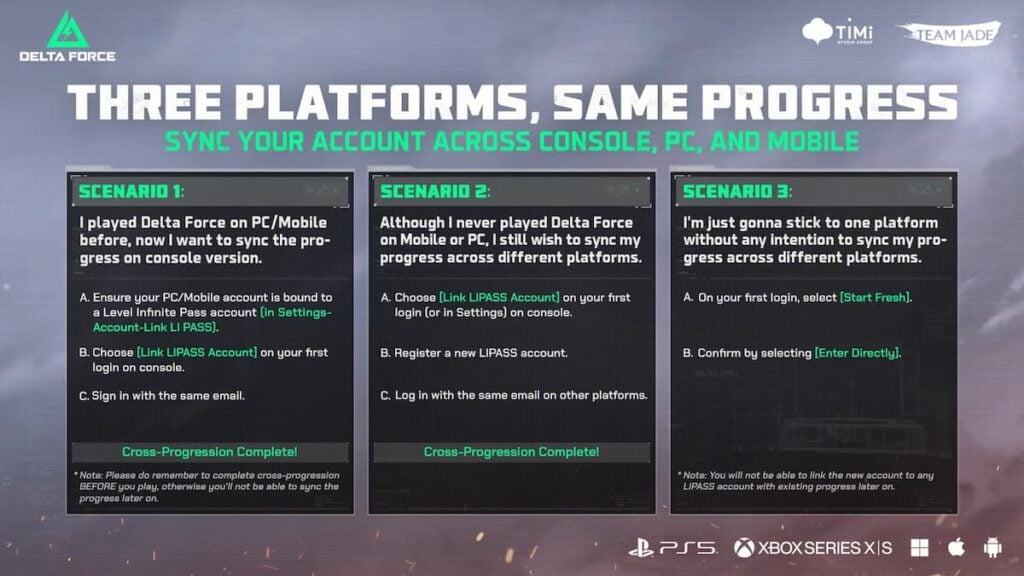
Alongside crossplay, Delta Force supports cross-progression in case you plan on switching to console from PC or even mobile. To move your progress from one platform to another, link your PC or mobile account to the Level Infinite Pass account before playing on console. Then sign in on the console using the Level Infinite Pass account.

Comments
[gs-fb-comments]